The problem with AI product photos usually isn't that they look bad. It's that they look great and the product has been quietly changed. The text on the bottle is different, the logo has shifted, and the numbers on the size chart were invented by the model. Ship an image like that and the best case is a platform rejection. The worst case is a return.
A repo on GitHub is aimed squarely at this: xianyu110/ecommerce-image-skills. It holds 12 Agent Skills for ecommerce images, was created on October 4, 2026, is MIT licensed, and had 171 stars when I wrote this. I read the README, several SKILL.md files and one of the check scripts end to end. One caveat up front: I have not generated any images with it. Everything below comes from reading the code and docs, not from using it.
My takeaway: the part worth stealing isn't "use AI to make images". It's how the repo constrains the AI while it does.
The 12 skills are really one pipeline
The repo splits "photographer plus designer" into 12 skills you can install one by one. Going by the README:
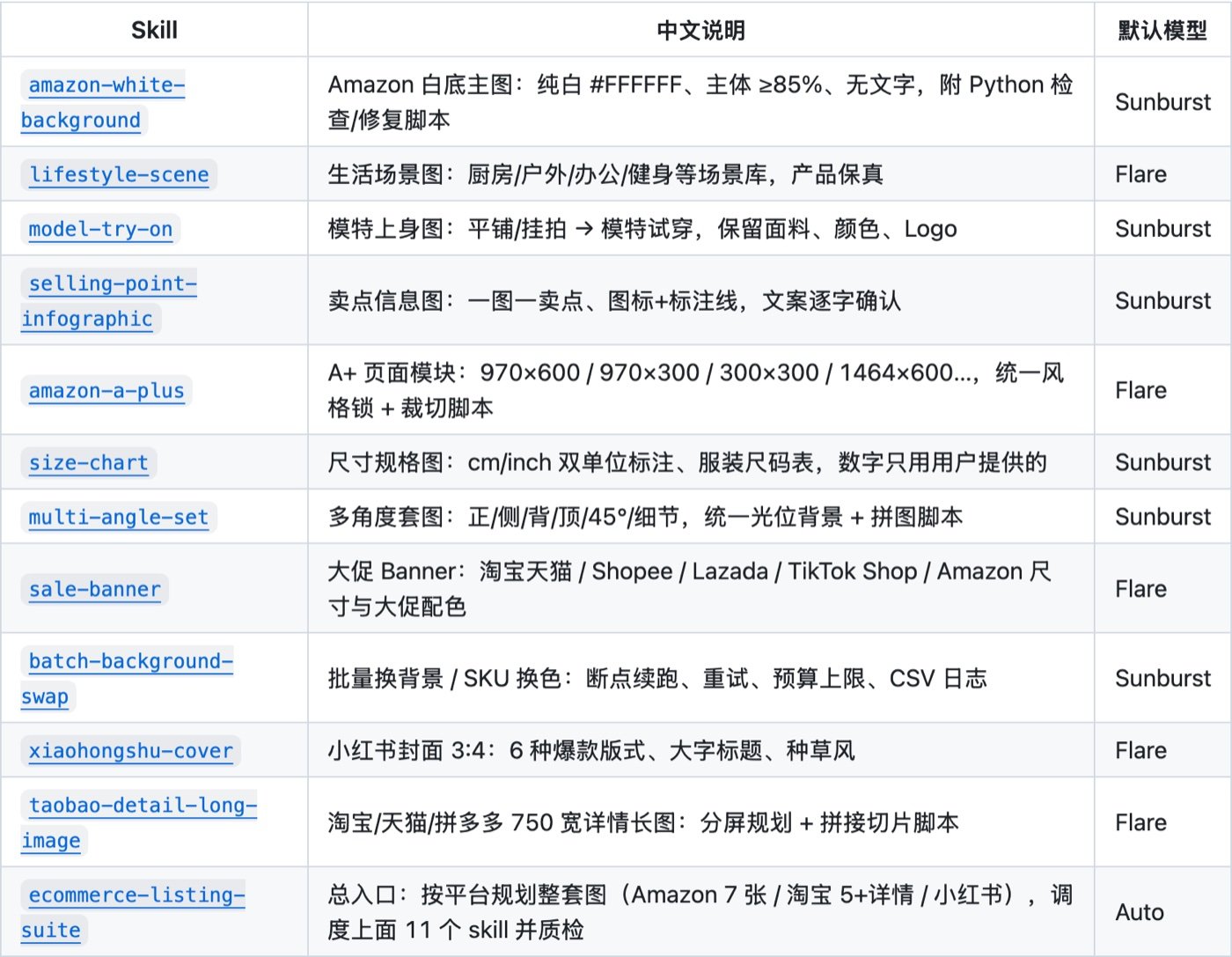
- Amazon white-background main image, lifestyle scene, on-model try-on, selling-point infographic
- Amazon A+ modules, size chart, multi-angle set
- Sale banners, batch background swap, Xiaohongshu cover, Taobao long detail page
- One entry point,
ecommerce-listing-suite, that plans a full image set for a platform and then calls the other eleven
Each SKILL.md runs between 96 and 115 lines, 1,251 lines in total. That's short enough to read in an afternoon, and I'd recommend actually reading one or two rather than trusting my summary.
Worth stealing #1: lock the product before getting creative
In the SKILL.md files I read, step one is the same block, "Product identity lock". The agent has to study the reference photos first and write down the shape, the colour and finish, the logo and printed text (spelling and position included), the parts that are in the box, and a list of things that must not appear. That block gets pasted verbatim into every prompt the skill produces, and no creative instruction is allowed to override it.
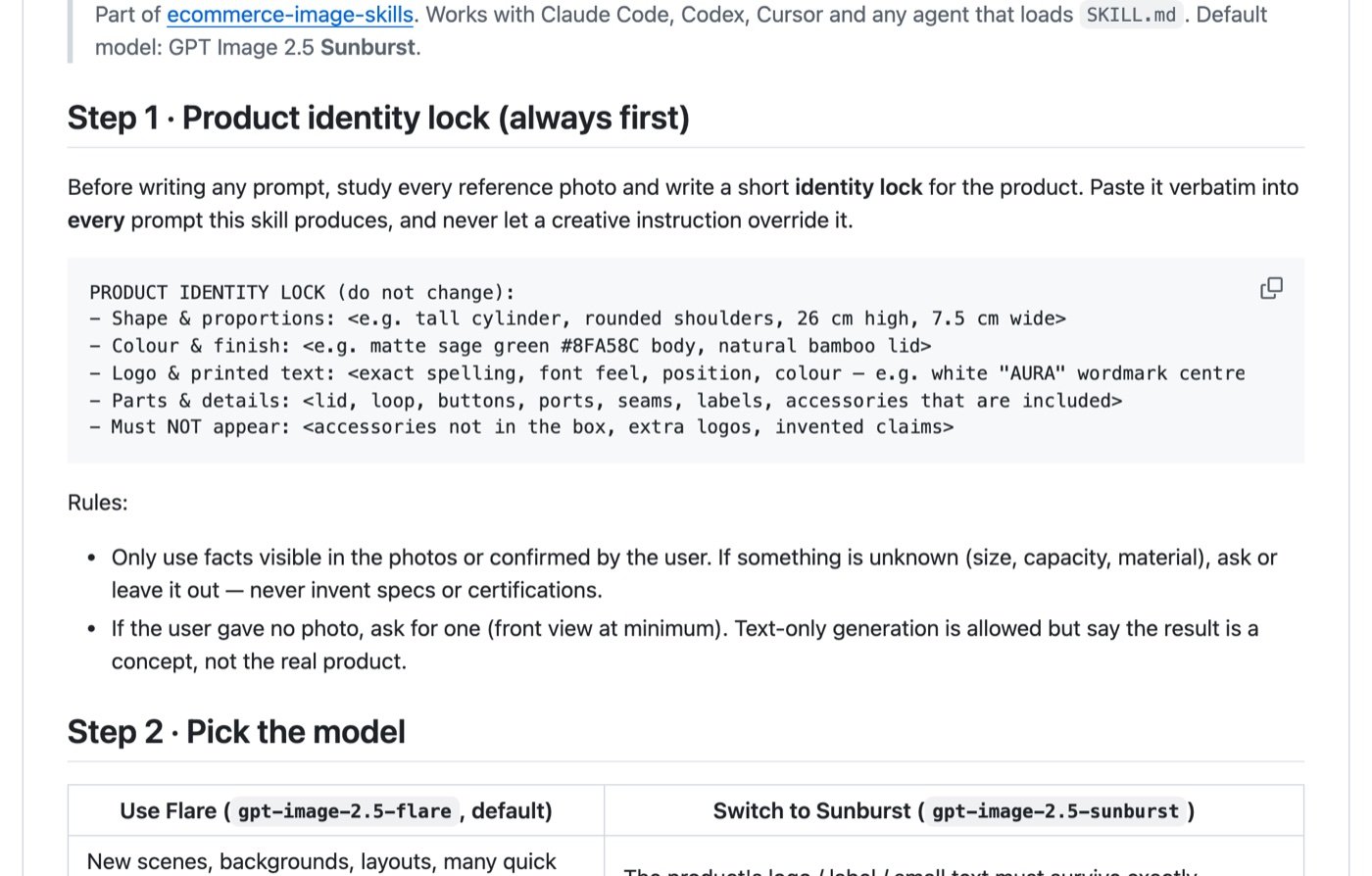
One more rule in there I agree with: use only facts visible in the photos or confirmed by the user. If size, capacity or material is unknown, ask or leave it out. Never invent specs or certifications.
This is the highest-value line in the whole repo, in my view. The baseline for a product image is that it matches what's in the box. The better image models get, the more tempting it is for them to "improve" the product. Turning "don't change it" into a fixed block in every prompt costs almost nothing and targets the most common failure directly.
You don't need to install anything to borrow it. In your own prompts, add a fixed product-lock paragraph with the exact logo text and colours, and a one-line "must not appear" list.
Worth stealing #2: let scripts check what can be checked
The white-background skill ships check_main_image.py. I read it. It checks whether the background pixels are pure white, whether the product fills enough of the frame, and whether the longest side has enough pixels. The defaults are --min-coverage 0.85 and --min-size 1000, and the --fix flag snaps near-white pixels to 255 and places the result on a white square canvas.
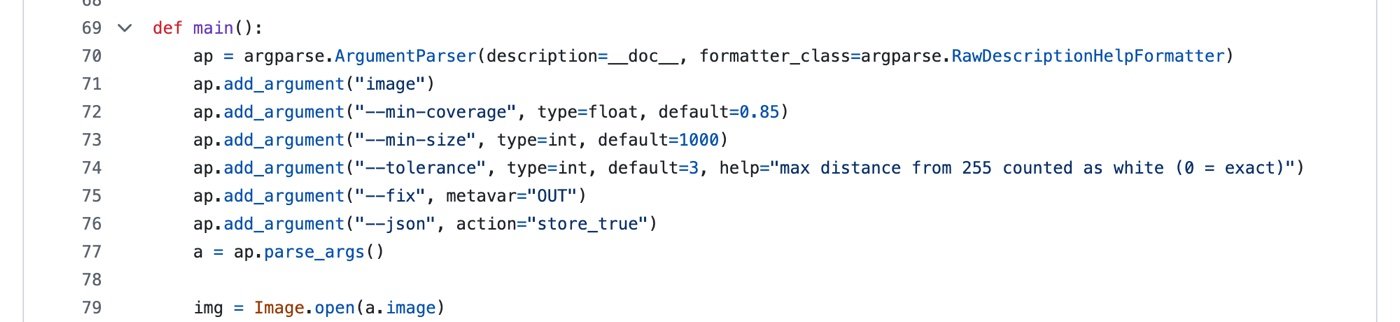
Those numbers line up with Amazon's own product image guide in Seller Central: a pure white background (RGB 255, 255, 255) and the product at 85% of the image.
Why is this a good design? Whether a background is exactly #FFFFFF isn't something to settle by asking the model whether it succeeded. A script that counts pixels is more trustworthy. The AI does the creating and the script does the acceptance test. I like that split. The blog pipeline on this site follows the same idea: a script hard-checks sources and length before anything gets published, and if it fails, nothing goes out.
The batch background-swap skill has the same flavour: resume after interruption, retries, a budget cap and a CSV log. The README's example is "swap 40 photos to a pure white background, spend at most 40 calls". Once you have more than a handful of SKUs, the two things you fear are a job that dies halfway and a bill that runs away. It plans for both.
Worth stealing #3: numbers come from you
The size-chart skill says in its description that "Numbers come only from the user", and it positions the image as a way to reduce returns caused by wrong size expectations.
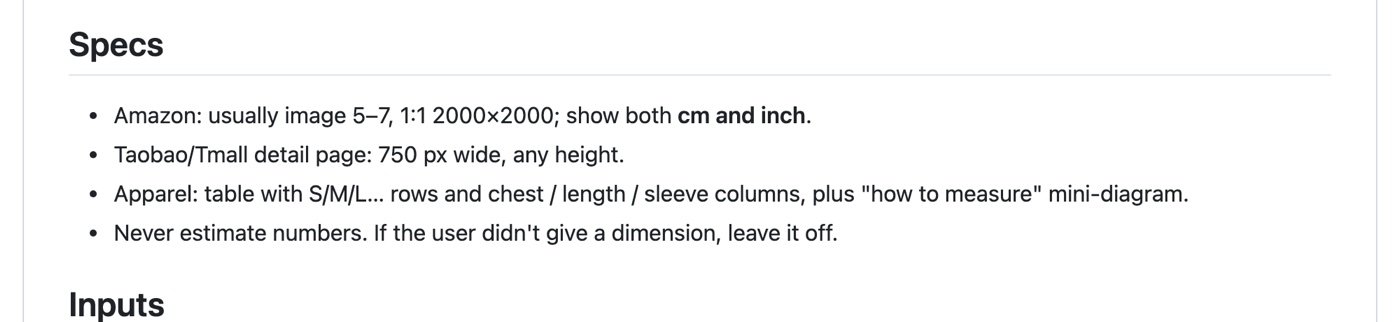
That's the right call. Infographics and size charts are where AI images fail most quietly: they look professional and the numbers may be made up. Whatever the model draws, check every figure yourself before you publish. Don't relax just because an AI made it.
Where I'd be careful
I couldn't verify the model names. The repo defaults to two models, Flare (gpt-image-2.5-flare) and Sunburst (gpt-image-2.5-sunburst), and routes between them: Flare for new scenes and many quick variants, Sunburst when a logo or small text has to survive or you're doing a local edit. I could not find these names in OpenAI's official documentation, so don't treat them as standard model IDs. What works for you depends on what your endpoint actually serves. The SKILL.md says to use the closest equivalent if an endpoint exposes different image models.
The README carries promotional links. The API gateway it recommends, tryallapi.com, has a sign-up link with an aff= parameter, and the online-run links carry utm tags. That's not a sin, since open-source authors need to fund their work, but you should know whose path you're being pointed down. The script accepts any OpenAI-compatible GPTIMAGE_BASE_URL, and if you don't set one it defaults to https://api.openai.com, so you don't have to use the recommended one.
I did not reproduce the showcase. The README says the gallery images are real outputs with no retouching, and it states openly that the input product, "AURA", is a fictional AI-generated item. So the gallery shows the flow works. It doesn't show that a real product with a complicated logo will come through unchanged. That's the part I'd most want you to test yourself: take your best seller, the one with the most detail, and run it.
The twelve skills share copy-pasted openings. Comparing several SKILL.md files, the identity-lock and model-selection sections appear almost word for word in each. The upside is that each folder is self-contained and you can copy just one. The downside is that changing a rule means editing it twelve times.
Who it suits, and who it doesn't
It suits: - Store owners already on Claude Code, Codex or Cursor who want their image rules written down once; - Anyone selling across platforms (Amazon, Taobao, Xiaohongshu), since the specs are built in and you stop looking up dimensions each time; - Anyone with many SKUs who needs bulk background swaps.
It doesn't suit: - Brands whose product detail is extremely complex and whose logo and text must match pixel for pixel. For those I'd hire a photographer and let AI extend the background at most; - People with no agent setup who don't want to deal with API keys. A hosted online tool is less hassle.
How I'd use it
I wouldn't install all twelve. I'd install the white-background skill alone, run one real product through it, look at the coverage and pure-white numbers the script reports, and only then decide whether to add more. For more tools in the same area, browse our ecommerce skills collection, ecom-details-image for detail pages, and background-removal for cutouts.
If you care more about the SEO side, I wrote about turning an SEO audit into an open-source skill. It's the same idea: write the standard into a skill so the agent follows it, instead of re-explaining it every time.
FAQ
How is an ecommerce image skill different from just writing a prompt?
A skill fixes the process, the specs and the checks: lock the product first, generate at the platform's sizes, then verify with a script. A prompt only covers one run. The repo makes that point about itself too, and the specs and check scripts are what a pile of prompts lacks.
What does Amazon require for a white-background main image?
According to the product image guide in Amazon Seller Central, the main image needs a pure white background (RGB 255, 255, 255) and the product should fill 85% of the image. Check the guide for your marketplace for the current details.
Is there compliance risk in AI-generated product photos?
The product shown must match what you actually ship. That's what platforms and customers care about, and it's why I rate the identity-lock step so highly. I haven't verified each marketplace's rules on disclosing AI-generated images, so check the current policy of the platform you sell on before publishing.
Is the repo free?
The repo is MIT licensed, so the code is free to use. Generating images means calling an image-model endpoint, and that cost depends on the service you connect.